A good g-code viewer shows you what your program will do before your machine does it. A great one also tells you what's wrong with it. Here are the eight we'd look at in 2026, from free browser tools to the verification software aerospace shops run, and who each one is best for.
Our pick for most CNC routers and mills: CutViewer. It's free, runs in your browser, and checks your program for problems before you cut. It's also what CNC Cookbook now recommends in place of its own G-Wizard Editor, which is no longer available.
Quick Picks
| Viewer | Best for | Price | Runs on |
|---|---|---|---|
| CutViewer | Checking 3-axis programs before you cut | Free | Any browser |
| CIMCO Edit | Production shops | From $26 per 30 days | Windows |
| NC Corrector | A free Windows editor for mill, lathe and wire EDM | Free | Windows |
| NCViewer | 4th/5th-axis programs and offline use in a browser | Free | Any browser |
| Predator CNC Editor | Starting free and upgrading later | Free Light edition; from $575 | Windows |
| NCPlot | Fanuc and Haas macro programming | $299 | Windows |
| VERICUT | High-value multi-axis verification | Quote only | Not stated |
| CAMotics | Free stock-removal simulation, with caveats | Free | Windows, Mac, Linux |
Prices are as listed on each developer's site in October 2026.
1. CutViewer
Best for: checking 3-axis programs before you cut. Free, in any browser.
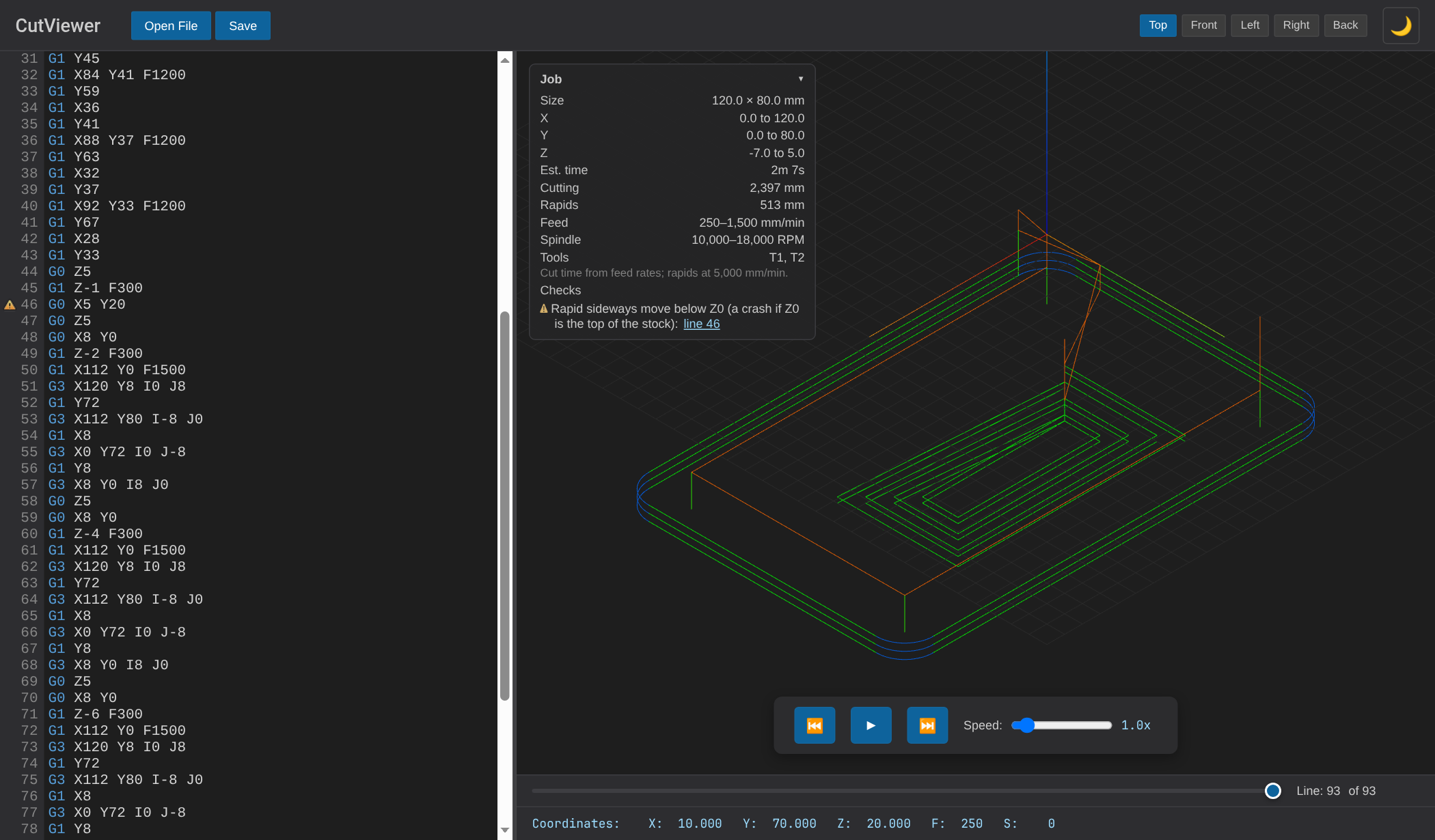
CutViewer is a free g-code viewer, editor and simulator that runs in your browser, with nothing to install and no account. Files are read in the browser, not uploaded. It's under active development, with new features added regularly.
What sets it apart is that it checks the program, not just draws it:
- Pre-flight checks flag a feed move with no feed rate, an arc whose end point isn't on the arc (using the same tolerance GRBL does), cutting with the spindle off, a rapid move below Z0 into uncut material, and a program with no G20/G21. Each problem links to the lines that cause it.
- A Job panel shows part size and X/Y/Z extents, estimated run time, cutting and rapid distance, feed and spindle ranges, and each tool with the lines it runs.
- The tool is drawn at the current position, sized from the tool comments your CAM writes (Fusion 360, CamBam, Mastercam, OneCNC, and the original CutViewer's TOOL/ lines).
- A debugger: step line by line, jump to the next tool change, rapid, dwell or problem, and see the active modes (units, G90/G91, plane, work offset, cutter comp, tool).
- Drilling cycles are drawn (G73, G81–G89 with G98/G99 retract), along with helical arcs and arcs in all three planes.
- Edit and save: the backplot updates as you edit, and Save downloads the result.
Limits: 3 axes only (no 4th/5th axis or lathe mode), no Fanuc macros or subprograms, no stock-removal simulation, and it needs an internet connection to open.
2. CIMCO Edit
Best for: production shops that want the industry-standard editor.
CIMCO Edit is the editor you'll find in a lot of professional shops. It's Windows software in two editions: Core for editing and backplotting, and Ultra, which adds solid simulation, collision detection and verification.
- Backplot for 3-, 4- and 5-axis milling, turning, and mill-turn.
- Side-by-side file compare that ignores renumbering and spacing changes, renumbering, and recordable macros.
- ISO and Heidenhain support, including Heidenhain-to-ISO conversion.
Price: Ultra is $1,000 to $3,800 for a lifetime license, or from $26 per 30 days as a subscription, with student pricing available. Core's price isn't listed. There's a 30-day trial.
3. NC Corrector
Best for: a free Windows editor and backplotter for milling, turning and wire EDM.
NC Corrector is long-running freeware that's still updated; the latest changelog entry is from September 2026.
- Editor synced with an OpenGL backplot.
- Drilling cycles (G81–G85), subroutines, G41/G42 cutter compensation, and Heidenhain and Anilam programs.
- Machine time, path length and a measuring tool.
- Overlay up to 100 programs, export to DXF or APT, renumbering, and sending to a machine over a COM port.
Price: free (donations welcome). Windows only.
4. NCViewer
Best for: 4th- and 5th-axis programs, or viewing offline, in a browser.
NCViewer is the best-known free online viewer. It was bought by Toolpath Labs in 2024 and is at version 1.2.0.
- 3- and 5-axis viewing and simulation, and a lathe diameter mode.
- An editor with syntax highlighting, find and replace, and save.
- Click a point on the toolpath to jump to it, plus play, pause, reverse and speed controls.
- Installable for offline use, and works on tablets and phones.
Limits: we found no run-time estimate, no part size or extents, no error checks, and no dark theme for the whole app. We've written a side-by-side comparison of CutViewer and NCViewer.
5. Predator CNC Editor
Best for: starting free and upgrading later, across a wide range of controls.
Predator CNC Editor (version 12) has a free Light edition with no time limit.
- 3D backplot for 2- and 3-axis mills, routers, waterjets, lasers, and 2-axis lathes.
- A long list of control dialects, including Fanuc, Haas, Siemens, Heidenhain, Mazak, Okuma and Fagor.
- File compare, sequence-number and bolt-circle wizards, and split view.
- For 4th/5th-axis and mill-turn, Predator's separate Virtual CNC adds solid material-removal simulation and optional machine models for collision checking.
Price: the full editor is from $575 perpetual or $250 a year. Virtual CNC's 5-axis edition is from $5,750. Windows.
6. NCPlot
Best for: Fanuc and Haas programmers who work with macros.
NCPlot is a focused editor and backplotter for 4-axis milling and 2-axis turning.
- Step-by-step debugging of Custom Macro B, G65 and G66 programs.
- Renumbering that updates GOTO, M98/M99/M97 and G70–G73 P/Q references.
- File compare and run-time estimates per tool.
- Haas-specific support, such as G47 engraving and M97.
Price: $299, with a 15-day free trial. Version 2.35 is from February 2024, and the listed system requirements stop at Windows 8, so check that it runs on your PC during the trial.
7. VERICUT
Best for: high-value multi-axis work, where a crash costs more than the software.
VERICUT (version 9.7) is at the top of the market: full machine simulation with collision detection, multi-axis verification, comparison against the CAD model, and feed-rate optimization. It's what shops doing aerospace and other high-value work use to prove out programs on expensive machines.
Price: quote only.
8. CAMotics
Best for: free stock-removal simulation, if you double-check what it shows.
CAMotics is free, open-source software for Windows, Mac and Linux. Its strength is simulating material removal: you see the cut part, not just the toolpath, and can export it as an STL.
Go in with your eyes open, though:
- The last downloadable release is version 1.2.0, from February 2019. The code has been worked on since, but newer versions haven't been released as downloads.
- That release predates some fixes. For example, the project's changelog lists "Fixed swapped G98 and G99" (the canned-cycle retract modes) in version 1.2.1, which hasn't been released as a download.
- It has a history of drawing correct code wrong. Its issue tracker records, for example, G18 arcs drawn in the wrong direction, R-format arcs drawn rotated, swapped G98/G99, and plunges and holding tabs drawn incorrectly. Most were fixed, but if what it shows doesn't make sense, check the program in a second viewer before changing your CAM settings.
- Not supported: 4th/5th axis and lathe, several canned cycles (including G73, G76, G83 and G84), cutter compensation (G41/G42), and dwells.
Also Worth Knowing
- NC Viewer for VS Code. If you write g-code in Visual Studio Code, the free NC Viewer extension adds a 3D preview, including Siemens Sinumerik R-parameters.
- Your CAM software's simulator. Fusion 360 and most CAM packages simulate their own toolpaths, but that isn't the same as checking the g-code your post-processor actually wrote. A separate viewer catches post-processor problems the CAM simulation can't.
- G-Wizard Editor from CNCCookbook is no longer available. We recommend CutViewer in its place.
Why Viewer Accuracy Matters
A viewer that draws your program wrong is worse than no viewer at all. If it shows an arc going the wrong way or a retract at the wrong height, you'll go looking for a problem in your CAM settings or post-processor that isn't there, or worse, trust a program that has a real problem.
When something looks wrong, open the file in a second viewer before you change anything. And prefer viewers that are actively maintained and tested against real CAM output.
How to Choose
- You run a hobby router or a 3-axis mill and want to check programs before cutting: start with CutViewer. It's free and needs nothing installed.
- You run 4th/5th-axis or lathe programs and want something free: NCViewer, or NC Corrector on Windows.
- You write Fanuc or Haas macros: NCPlot.
- You run a production shop and want the standard tool: CIMCO Edit, or Predator if you want to start with the free Light edition.
- You need to prove out expensive multi-axis work: VERICUT or Predator Virtual CNC.
- You want to see the finished part, for free: CAMotics, with the caveats above.
Not sure how to judge one yourself? Our NC viewer buyer's guide covers the features to look for, and our g-code viewer walkthrough shows how to check a program step by step.
How We Compared Them
We reviewed the current version of each product from its developer's website and documentation in October 2026, and checked CAMotics' public issue tracker and changelog. We tested CutViewer with our own example g-code files. Prices and versions change, so check the developer's site before you buy. If something here is out of date, let us know.
Be the first to know about updates at CNC Cookbook
Join our newsletter to get updates on what's next at CNC Cookbook.