Is Manual Machining Faster Than CNC For Simple Parts?
Not With Conversational Programming!
G-Wizard Editor's Conversational Programming let you use simple point and shoot Wizards to generate quick G-code. G-Wizard Editor isn't available right now. Here's what happened to G-Wizard.
No CAD drawings, no CAM, no complex G-code programming-perfect for quick projects.
CAM isn't always the best answer
Sometimes you need a faster, simpler solution
Sometimes you need Conversational Programming Software
Look, CAM is indispensible, but for some simple jobs it's overkill. Here's what's wrong with using CAM for every CNC programming task:
CAM needs a drawing to start from. With CAM, there's no working from the back of the envelope.
CAM needs a lot of detail to support all the fancy things it can do. But if you're not doing anything fancy, why provide all the detail?
CAM is expensive and not everyone has a seat. How can knowledgeable machinists be productive without CAM?
CAM has a steep learning curve. How do manual machinists leverage their considerable knowledge to be productive right away?
CADCAM is powerful but slow. You can't do complex jobs without it. But why be slow on simple jobs?
Conversational Programming can help with all these problems.
Conversational Programming was a Built-in Module of G-Wizard Editor
Here's How it Worked:
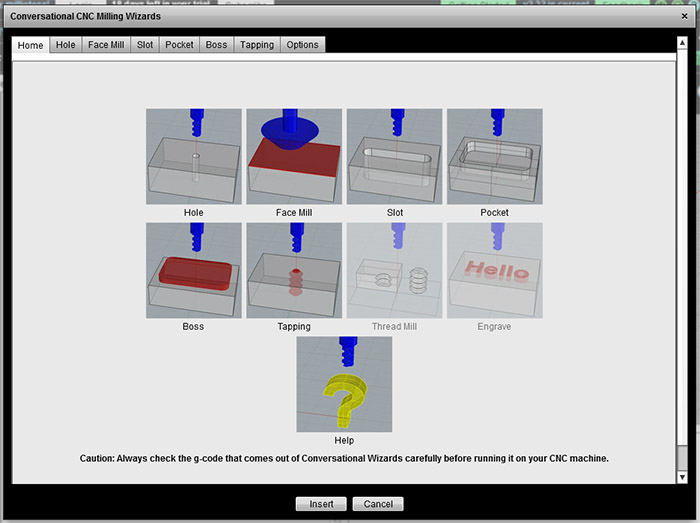
Start Simple: Pick an Operation
You chose the Conversational Wizard for your task:
There were simple Wizards for most common tasks by machine. Mills and Routers got the Wizards shown above. Lathes got their own Wizards:

Fill in the Blanks
A popup appeared giving you a simple set of inputs to fill in:

Easy to Access Power
It was easy to fill in the blanks, but they gave you easy access to power. Each Wizard was designed with an eye towards what real world machining situations need.
Here are just a few of the power features it had:
- Facing Wizard would radius into the cut, which reduces the wear on your tooling and improves surface finish.
- Variety of patterns for holes were available including grids, vectors, circles, arcs, and even the ability to load a list of hole coordinates from another source.
- Our custom Deep Hole Cycles could save time and go deeper than canned machine drilling cycles.
- Lots of little ease-of-use touches like the ability to "Break all edges" with a single click while turning multiple OD diameters.
Add Conversational CNC to Your Toolbox
Everyone should have a little Conversational CNC Programming power in their Toolbox. It doesn't replace CAM, but it sure is handy for a lot of jobs.
Be the first to know about updates at CNC Cookbook
Join our newsletter to get updates on what's next at CNC Cookbook.